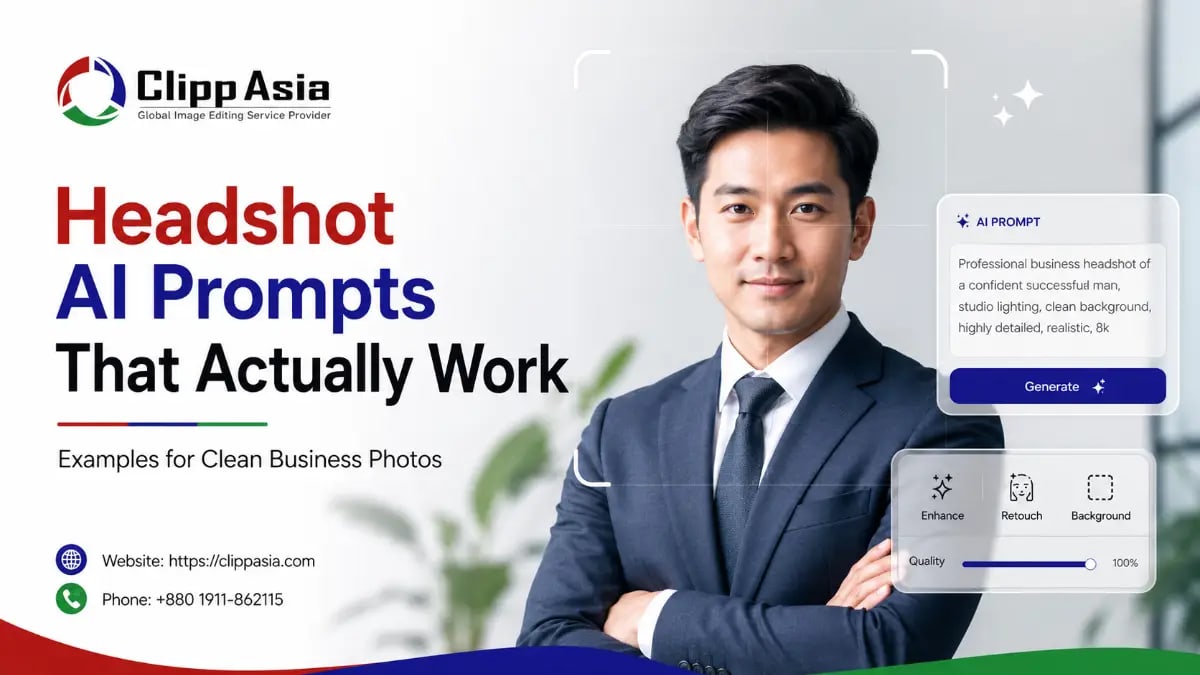
Headshot AI Prompts That Actually Work: Examples for Clean Business Photos
AI can help you create cleaner business photos. But your prompt must guide the tool clearly.
You need details about lighting, clothing, pose, and background. A strong prompt should protect your real identity. Final editing still helps your image look more natural.
Why Business Headshots Matter Online
Your headshot often creates your first impression. People see it before they meet you. That image appears on LinkedIn, company pages, resumes, portfolios, and email profiles. A clean photo can support trust quickly.
You do not need a luxury studio first. You need a clear face, soft lighting, proper framing, and natural editing. A polished headshot helps you look prepared and approachable. It also supports your personal brand. If your photo needs cleanup after AI generation, ClippAsia can improve details through Photo Retouching Services for a cleaner business look.
Why Headshot AI Prompts That Actually Work Need Clear Details
AI tools do not read your mind. They follow your words. So vague instructions often create strange results. You may get odd lighting, fake skin, stiff clothing, or an unrealistic background.
A strong prompt explains the goal. It tells the tool your style, setting, lighting, camera angle, and mood. You should also describe what to avoid. For example, say “natural skin texture” instead of “perfect skin.” That small detail can improve realism. You should also use your own photo only. Never use AI to impersonate someone else.
How to Write Better Prompts for Headshots
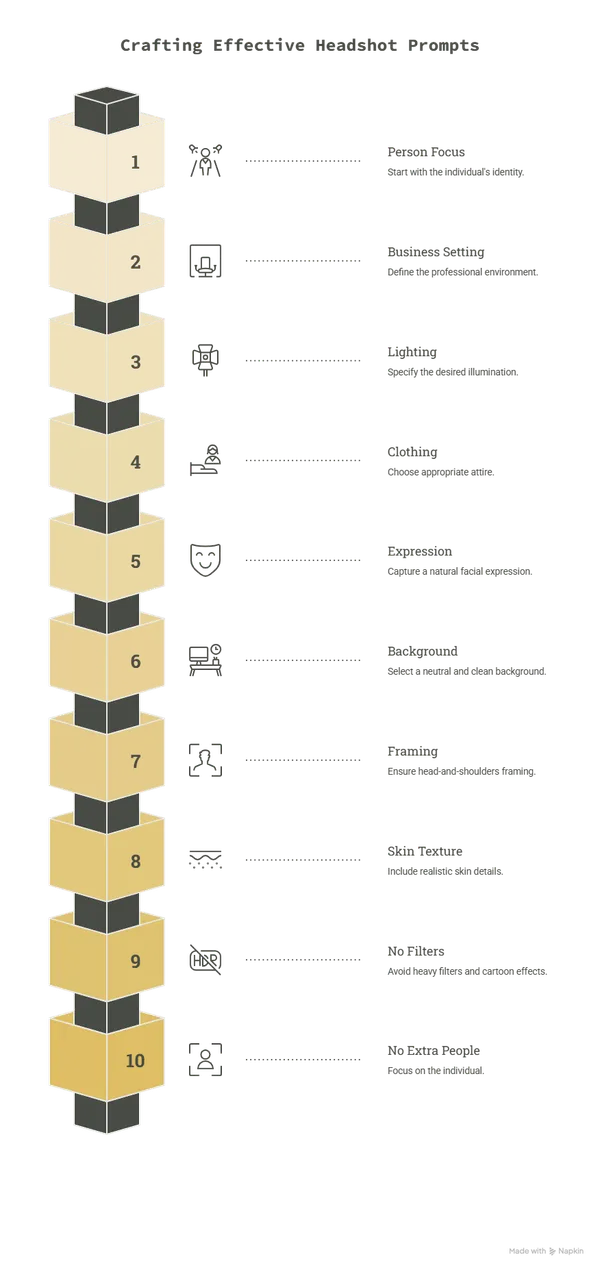
Good prompts for headshots start with the person. Then they explain the business setting. After that, they describe lighting, clothing, expression, and background. This keeps the output focused.
For better results, headshot ai prompts that actually work should include these details:
- Your role or industry
- A natural facial expression
- Clean business clothing
- Soft studio lighting
- Neutral office background
- Real skin texture
- Head-and-shoulders framing
- No heavy filters
- No cartoon effect
- No extra people
Think like a photographer. You guide the scene before the photo exists. Then you improve the result with editing. If your background looks messy, Background Removal Services can help create a clean final image.
Best Headshot AI Prompts That Actually Work Examples
Below are practical prompt examples. You can use them with AI image tools. Always adjust them for your real role, style, and platform.
1. LinkedIn Business Headshot Prompt
Use this prompt for a polished profile photo.“Create a realistic business headshot of me. Use a neutral office background, soft natural lighting, and a confident smile. Keep my face natural. Use professional clothing, sharp focus, and clean head-and-shoulders framing. Avoid plastic skin, heavy filters, or dramatic shadows.” This is a strong ai photo prompt for headshot creation. It gives the tool a clear scene. It also tells the tool what not to add.
2. Corporate Website Headshot Prompt
Use this for company team pages. “Create a clean corporate headshot from my photo. Keep my real facial features. Use a light gray background and soft studio lighting. Add a neat business outfit. Keep the pose relaxed, friendly, and professional. Make the image suitable for a company website.” This realistic ai headshot prompt works well for service brands. It keeps the image simple. It also avoids an over-edited look.
3. Freelancer Profile Headshot Prompt
Use this for Upwork, Fiverr, or portfolio pages. “Create a professional freelancer headshot. Keep my face realistic and natural. Use a clean indoor background, soft lighting, and smart casual clothing. Make me look friendly, skilled, and trustworthy. Use sharp focus and natural colors.” This prompt works well for service providers. A freelancer needs trust fast. Your face should look real, not overly perfect.
ChatGPT Headshot Prompt for Better Image Direction
A chatgpt headshot prompt can help you plan the image first. ChatGPT may not always create the photo directly. But it can help you write better image instructions. You can ask it to refine your prompt before using another image tool.
Try this prompt: “Act as a business portrait photographer. Write a detailed AI image prompt for a clean professional headshot. The person should look friendly, confident, and natural. Include lighting, background, clothing, pose, camera angle, and editing style. Keep the final look realistic.” You can then paste the result into your image tool. This method saves time. It also helps you avoid weak instructions.
Gemini Headshot Prompt for Clean Business Images
A gemini headshot prompt should also stay simple. You can ask Gemini to create or refine a prompt. You can also ask it to match a specific professional use.
Here is one example: “Create a realistic business headshot from my uploaded image. Keep my real face and natural expression. Use soft studio lighting, a clean office background, and professional clothing. Make the image suitable for LinkedIn and a company bio. Avoid fake skin texture, extra fingers, or distorted facial features.”
This prompt gives clear quality control. It also protects your likeness. After generation, check the face carefully. AI can change small features. If the color looks uneven, ClippAsia can help through Color Correction Services.
AI Prompt to Make Photo Look Professional
An ai prompt to make photo look professional works best when you start with a real photo. This helps the output look closer to you. It also makes the image more believable.
Try this prompt: “Improve this photo into a professional business headshot. Keep my real facial features and natural skin texture. Use soft lighting, clean color balance, and a simple background. Make the clothing look neat. Keep the style realistic, friendly, and suitable for a work profile.” This is a safer prompt. It does not ask AI to invent a new person. It improves the image you already own. That matters for trust. If your original image has flaws, High End Retouching Services can polish details without making you look fake.
Can AI Create Professional Headshots?
Many people ask, can ai create professional headshots for work profiles? Yes, AI can create business-style images. But the result depends on your prompt, photo quality, and tool limits.
AI may create strange details. It can change your face, hair, teeth, ears, or clothing. So you must review every result closely. A real business headshot should still look like you. That is why headshot ai prompts that actually work should focus on realism. You should also use human editing when accuracy matters.
What Is the Best Prompt for AI Headshot?
People often ask, what is the best prompt for ai headshot results. The best prompt is specific, realistic, and simple. It should guide the tool like a photo brief.
Here is a complete example:
“Create a realistic professional headshot using my uploaded photo. Keep my real facial structure, natural skin texture, and true expression. Use soft studio lighting and a clean neutral background. Add professional business clothing. Use head-and-shoulders framing. Make the photo suitable for LinkedIn, company profiles, and business websites. Avoid plastic skin, heavy makeup, fake teeth, distorted eyes, extra people, or cartoon style.”
This prompt covers the full scene. It also includes negative instructions. That helps AI avoid common mistakes.
Headshot Prompt Formula You Can Reuse
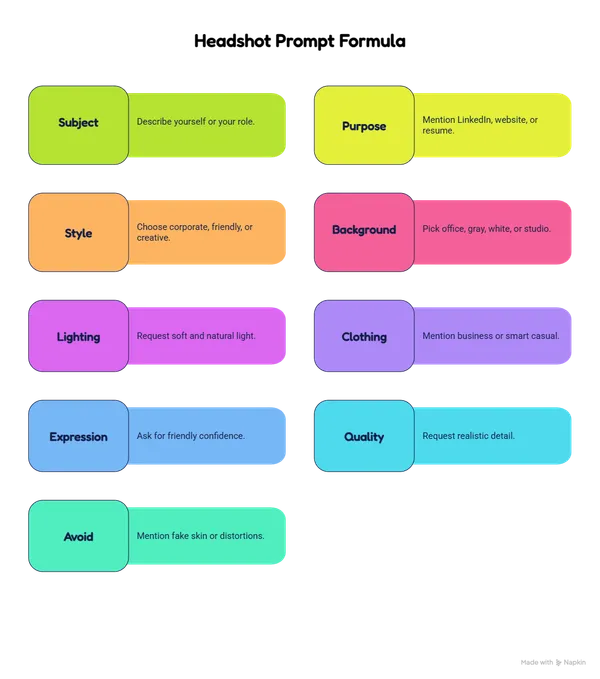
You can use this simple formula anytime. It helps you create stronger prompts for headshots without guessing.
Use this structure:
- Subject: Describe yourself or your role.
- Purpose: Mention LinkedIn, website, or resume.
- Style: Choose corporate, friendly, or creative.
- Background: Pick office, gray, white, or studio.
- Lighting: Request soft and natural light.
- Clothing: Mention business or smart casual.
- Expression: Ask for friendly confidence.
- Quality: Request realistic detail.
- Avoid: Mention fake skin or distortions.
Here is the formula in one line: “Create a realistic professional headshot of [person] for [platform], with [background], [lighting], [clothing], [expression], and [style]. Keep [realistic details]. Avoid [bad details].” This formula saves time. It also keeps your output consistent. For final profile polish, ClippAsia offers Headshot and Restoration Services for cleaner personal branding photos.
Common Mistakes With AI Headshot Prompts
Many users write short prompts. Then they expect perfect results. That rarely works. AI needs context to create clean images.
Avoid these common mistakes:
- Asking for “perfect” skin
- Using unclear background details
- Forgetting lighting instructions
- Skipping clothing style
- Ignoring camera framing
- Using someone else’s photo
- Asking for unrealistic beauty changes
- Forgetting negative prompts
- Publishing without checking details
A clean headshot should still look human. Small lines, real texture, and natural light matter. Do not remove every sign of reality. Your goal is a polished photo, not a fake identity.
Simple Prompt Examples by Profession
Different careers need different headshot styles. A lawyer may need a formal look. A designer may need a creative profile. A coach may need warmth and trust.
Here are useful examples:
For a consultant:
“Create a realistic consultant headshot. Use a clean office background, soft lighting, and formal clothing. Keep the expression calm, confident, and approachable.”
For a real estate agent:
“Create a friendly professional headshot for a real estate profile. Use bright natural light, smart business clothing, and a clean modern background.”
For a designer:
“Create a creative professional headshot. Use soft lighting, a simple studio background, and smart casual clothing. Keep the mood confident and modern.”
For a healthcare profile:
“Create a trustworthy professional headshot. Use clean lighting, neutral colors, and a calm expression. Keep the style realistic and respectful.”
These examples help you match audience expectations. They also support platform intent.
How to Make AI Headshots Look More Natural
Natural results need balance. You should avoid dramatic edits. Real business photos do not need perfect skin or movie lighting. They need trust.
Follow these tips:
- Use a real photo as reference.
- Keep your real facial structure.
- Ask for natural skin texture.
- Choose soft lighting.
- Use simple backgrounds.
- Avoid fantasy styles.
- Check eyes and teeth.
- Review hair and clothing.
- Edit final details carefully.
You should also compare the result with your real face. If it feels too different, do not publish it. Your headshot should help people recognize you. When your image needs subtle cleanup, use expert editing instead of extreme AI changes.
AI Headshots vs Real Studio Headshots
AI headshots and studio photos both have value. AI is faster for testing ideas. A studio shoot gives stronger control and real accuracy. Your choice depends on your goal.
|
Option |
Best For |
Main Risk |
|
AI headshot |
Quick profile updates |
Face may look different |
|
Studio headshot |
High-trust business use |
Higher time and cost |
|
Edited real photo |
Natural professional look |
Needs skilled editing |
|
Hybrid workflow |
Fast and polished result |
Needs careful review |
Many brands use a hybrid workflow. They start with a real photo. Then they improve background, color, and skin details. This keeps the image real and clean.
How ClippAsia Helps After AI Headshot Creation
AI can create a draft. But editing makes it publish-ready. You may need cleaner skin, better color, sharper edges, or a neater background. That is where human quality control helps.
ClippAsia helps business owners, freelancers, teams, and ecommerce brands improve images. You can use our services for personal profiles, company pages, marketing assets, and website visuals. Our editors focus on clean results, natural detail, and consistent quality. We help you avoid the fake look that hurts trust.
FAQs About AI Headshot Prompts
What makes a strong AI headshot prompt?
A strong prompt explains lighting, background, clothing, pose, and style. It also tells the tool what to avoid. This helps the final image look cleaner.
Can I use one prompt for every platform?
You can use one base prompt. But you should adjust it for each platform. LinkedIn, resumes, and team pages may need different styles.
Should I use a real photo first?
Yes, use your own real photo when possible. It helps the result match you better. It also lowers the risk of a fake-looking image.
Why does my AI headshot look fake?
Your prompt may be too vague. You may also ask for overly perfect features. Add natural skin texture, soft light, and realistic details.
Can ClippAsia edit AI headshots?
Yes, ClippAsia can help polish image details. Our team can improve color, background, retouching, and overall quality. You can contact us for custom support.
Final Thoughts on Headshot AI Prompts That Actually Work
Good AI headshots start with clear instructions. Your prompt should describe the person, platform, style, background, and lighting. It should also protect realism. That matters because business photos must build trust. If you want clean, professional, and natural image support, ClippAsia can help. Visit clippasia.com to explore our editing services. You can email us at info@clippasia.com for project help. You can also reach us through the Contact Page.